From git pull to GitOps: How I Built a Production CI/CD Pipeline on a $12 DigitalOcean Droplet

From 15-minute manual deploys with downtime to 5-minute automated pipelines with 2-second container swaps: how I transformed my portfolio's deployment workflow using GitHub Actions, GHCR, and Docker Compose.
"If deploying scares you, you're not deploying often enough."
⚠️ The Problem:
Manual Deploys Don't Scale
My portfolio (luisfaria.dev) runs a full-stack application on a single DigitalOcean droplet. The stack is real — not a static site, but a living MERN application with authentication, a chatbot, rate limiting, and a GraphQL API.
| Component | Technology |
|---|---|
| Infrastructure | Ubuntu 24.10 droplet (2GB RAM, 1 vCPU, 70GB disk) |
| Orchestration | Docker Compose (5 containers) |
| Frontend | Next.js 16 (standalone mode) |
| Backend | Node.js + Express + Apollo Server + GraphQL |
| Database | MongoDB 4.4 |
| Cache | Redis |
| Reverse Proxy | NGINX with SSL (Let's Encrypt) |
Every time I wanted to ship a change, here's what I did:
# The "old way" — every single time
ssh root@my-server
cd /var/www/portfolio
git pull origin master
docker compose down          # Site goes DOWN
docker compose build         # 10+ minutes on 1 vCPU
docker compose up -d         # Pray it works
docker compose logs          # Check for errors
The pain points were real:
- 10+ minutes of downtime per deploy (building Node.js/Next.js on a 1 vCPU machine)
- No automated tests — I could push broken code directly to production
- No rollback — if something broke, I'd manually
git revertand rebuild - Fear of pushing — every deploy was a gamble
The Goal
Turn this into a one-step process:
git push origin master → ✅ Tests → 📦 Build → 🚀 Deploy → 🔔 Discord pingWith automated rollback if anything goes wrong.
🏛️ The Architecture:
GitHub Actions → GHCR → DigitalOcean
Here's the pipeline I designed:
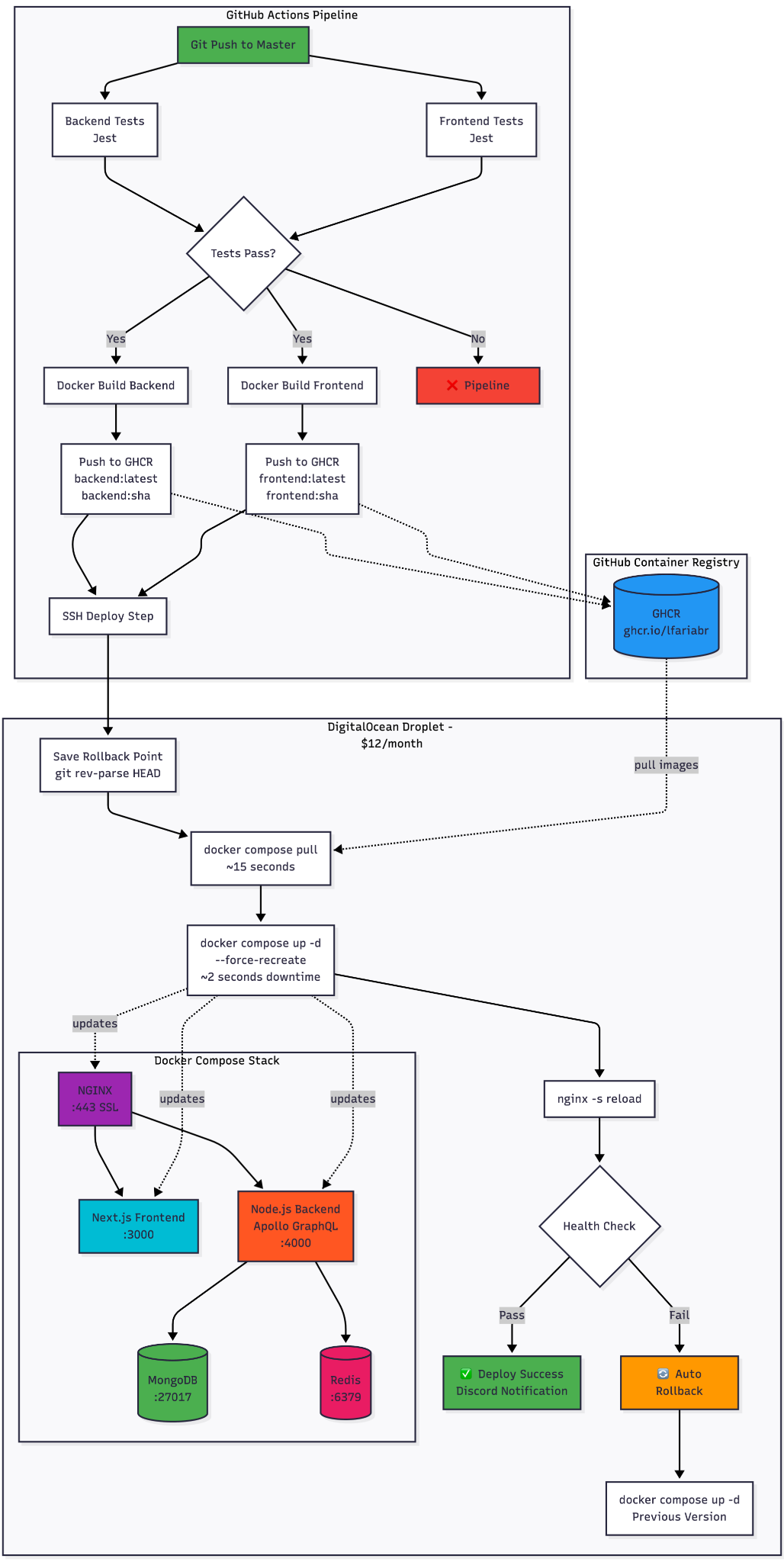
The key insight: Don't build on the server. Build in GitHub Actions (free runners with 7GB RAM), push to GHCR, and just pull on the VPS.
📝 The Journey:
20+ Iterations, 8 Bugs, 1 Working Pipeline
This didn't work on the first try. Or the fifth. Here's the honest changelog — every failure and its fix.
Phase 1: Foundation (Issues 1-3)
GitHub Actions + Docker Registry + SSH Access
Setting up the basics: a CI workflow that runs Jest tests in parallel, builds Docker images, and pushes them to GitHub Container Registry.
# .github/workflows/ci.yml (simplified)
jobs:
  backend-test:
    runs-on: ubuntu-latest
    steps:
      - uses: actions/checkout@v4
      - run: npm ci
      - run: npm test -- --coverage

  frontend-test:
    runs-on: ubuntu-latest
    steps:
      - uses: actions/checkout@v4
      - run: npm ci
      - run: npm test -- --coverage

  docker-build:
    needs: [backend-test, frontend-test]
    steps:
      - uses: docker/build-push-action@v5
        with:
          push: true
          tags: ghcr.io/lfariabr/luisfaria.dev/frontend:latest
For secure server access, I created a dedicated deploy user with Docker permissions and ED25519 SSH keys stored in GitHub Secrets. No root access, no passwords — just key-based auth.
Phase 2: Deployment + Rollback (Issues 4-5)
The deploy step SSHs into the server, pulls the latest images, and restarts containers:
deploy:
    needs: [docker-build]
    steps:
      - uses: appleboy/ssh-action@v1.0.3
        with:
          host: ${{ secrets.DEPLOY_HOST }}
          username: ${{ secrets.DEPLOY_USER }}
          key: ${{ secrets.DEPLOY_KEY }}
          script: |
            cd /var/www/portfolio

            # Save rollback point
            git rev-parse HEAD > /var/lib/deploy-rollback/commit.txt

            # Pull pre-built images (FAST!)
            docker compose pull

            # Swap containers (~2 seconds)
            docker compose up -d --force-recreate --remove-orphans
Automated rollback saves the current commit SHA before each deploy. If health checks fail, the pipeline automatically reverts:
# Auto-rollback on failure
PREV_COMMIT=$(cat /var/lib/deploy-rollback/commit.txt)
git reset --hard $PREV_COMMIT
docker compose up -d --force-recreate --remove-orphans
Phase 3: The Hard Part — 8 Bugs in 11 Iterations
This is where things got real. Here's every failure I hit:
| # | Error | Root Cause | Fix |
|---|---|---|---|
| 1 | ssh: unable to authenticate | Wrong format for DEPLOY_KEY secret | Pasted full private key content (not fingerprint) |
| 2 | dubious ownership in repository | Deploy user ≠ repo owner | git config --global --add safe.directory |
| 3 | Permission denied .git/FETCH_HEAD | File ownership mismatch | chown -R deploy:deploy /var/www/portfolio |
| 4 | local changes would be overwritten | Server had uncommitted drift | Switched from git pull to git reset --hard |
| 5 | Deploy timeout (CPU maxed) | Building images on a $12 droplet | Stopped building on server — pull from GHCR instead |
| 6 | 502 Bad Gateway | Frontend container crashed + NGINX stale DNS | --force-recreate + nginx -s reload |
| 7 | Container name conflict | Dead container blocking recreation | Added --force-recreate flag |
| 8 | Cannot find module @apollo/server/express4 | Apollo Server v5 breaking change | Installed @as-integrations/express4 |
Bug #5 was the turning point. I was building Docker images on the server — a 1 vCPU machine trying to compile Next.js and Node.js simultaneously. It would timeout after 10 minutes, CPU pegged at 100%.
The fix was embarrassingly obvious: I was already building images in GitHub Actions. Just use them!
# docker-compose.yml — BEFORE (slow, broke the server)
webapp:
  build: ./frontend

# docker-compose.yml — AFTER (fast, reliable)
webapp:
  image: ghcr.io/lfariabr/luisfaria.dev/frontend:latest
Bug #6 was the sneakiest. After deploying new images, the site returned 502 Bad Gateway. The frontend container was running and responding on port 3000. But NGINX couldn't reach it. Why?
Docker Compose assigns internal IPs to containers. When --force-recreate destroys and recreates a container, it gets a new IP. NGINX had cached the old IP. The fix: reload NGINX after container recreation.
🏆 The Unexpected Hero: TDD
Here's a story I didn't expect to tell: After the pipeline was working, I made a simple change — added "2026" to my portfolio's timeline section. Pushed to master. The CI pipeline kicked in... and blocked the deploy.
Why? My Jest tests validated the timeline data, and "2026" wasn't in the expected values.
FAIL  src/__tests__/components/sections/TimelineSection.test.tsx
  ✕ should render timeline years correctly
I fixed the test, pushed again, and the deploy went through automatically. The pipeline caught a bug that would have been invisible in a manual workflow.
TDD doesn't just catch logic errors — it catches deployment errors too.
📊 Result
| Metric | Before | After |
|---|---|---|
| Deploy time | 15-20 min (manual SSH + build) | ~5 min (automated end-to-end) |
| Downtime | 10+ min (docker build on server) | ~2 seconds (container swap) |
| Rollback | Manual git revert + rebuild | Automatic on health check failure |
| Test coverage | None before deploy | Full Jest suite (backend + frontend) |
| Notifications | Check server logs manually | Discord ping on success/failure |
| Confidence | Afraid to push on Friday | Push anytime, pipeline has my back |
Pipeline Stats
- Total CI time: ~5 minutes (tests → build → push → deploy)
- Container swap downtime: ~2 seconds
- Image pull time: ~15 seconds (vs 10+ min for
docker build) - Reliability: 100% after hardening (11 iterations)
📌 Key Takeaways
Five lessons from building CI/CD on a budget:
1. Don't Build on Small VPS
Offload compilation to CI runners. GitHub Actions gives you 7GB RAM and 2 vCPUs for free. Your $12 droplet should only pull and run.
2. TDD Is Your Deployment Safety Net
Tests caught bugs I would have shipped to production. The pipeline won't deploy what doesn't pass — and that's the point.
3. Force-Recreate Everything
Stale containers cause mysterious failures. Always use docker compose up -d --force-recreate in CI. The 2-second overhead is worth the reliability.
4. Reload NGINX After Container Swaps
Docker DNS caches container IPs. After --force-recreate, NGINX still points to the old IP. Always nginx -s reload.
5. Fail Fast, Log Everything
Every one of those 8 bugs was diagnosed through logs. Verbose output in CI scripts is not noise — it's your debugging lifeline.
Tech Stack
| Layer | Technology | Purpose |
|---|---|---|
| CI/CD | GitHub Actions | Test, build, deploy orchestration |
| Registry | GHCR (GitHub Container Registry) | Docker image storage, tagged by SHA |
| Frontend | Next.js 16 (standalone) | SSR portfolio with React 19 |
| Backend | Node.js + Apollo Server 5 + GraphQL | API with auth, rate limiting, chatbot |
| Database | MongoDB 4.4 | Document storage |
| Cache | Redis | Rate limiting, session management |
| Proxy | NGINX + Let's Encrypt | SSL termination, reverse proxy |
| Infra | DigitalOcean Droplet | Ubuntu 24.10, Docker Compose |
| Notifications | Discord Webhooks | Deploy success/failure alerts |
| Testing | Jest | Unit + integration tests (backend + frontend) |
Future Roadmap
While the current pipeline covers the essentials, there's room to grow:
Staging Environment
Branch-based deployments with a separate staging environment for pre-production testing. Currently deferred — the portfolio doesn't justify the cost of a second droplet.
Monitoring & Alerting
Sentry for error tracking, uptime monitoring, and resource alerts. Current health checks cover the basics, but production-grade observability is the next evolution.
Zero-Downtime Deploys
True zero-downtime with multi-replica services and rolling updates via Docker Swarm or a lightweight orchestrator. Current ~2s downtime is acceptable for a portfolio, but the architecture is ready for it.
Try It Yourself
The full CI/CD implementation is open source:
| Resource | Link |
|---|---|
| Live Site | luisfaria.dev |
| Open Source Repo | https://github.com/lfariabr/luisfaria.dev |
| CI Workflow | .github/workflows/ci.yml |
| Docker Compose | docker-compose.yml |
| Epic Tracker | Issue #107 — CI/CD Epic |
| All 20+ CI Commits | Commit history |
Let's Connect!
Building this CI/CD pipeline was one of the most rewarding engineering challenges on my portfolio — 20+ iterations of debugging SSH keys, Docker DNS, NGINX caching, and package breaking changes. Every failure taught me something production engineers deal with daily.
If you're working with:
- GitHub Actions and Docker-based deployments
- DigitalOcean or similar VPS infrastructure
- MERN/Next.js applications in production
- CI/CD pipelines on a budget
I'd love to connect and trade war stories:
- LinkedIn: linkedin.com/in/lfariabr
- GitHub: github.com/lfariabr
- Portfolio: luisfaria.dev
Tech Stack Summary:
| Current Implementation | Future Extensions |
|---|---|
| GitHub Actions, GHCR, Docker Compose, NGINX, Next.js, Node.js, MongoDB, Redis, Jest, Discord Webhooks | Staging environment, Sentry, zero-downtime rolling updates, Kubernetes migration |
Built with ☕ and a couple of failed deploys by Luis Faria
Whether it's concrete or code, structure is everything.